
Overview
Most operations work in manufacturing is repeatable, yet very little of it is automated.
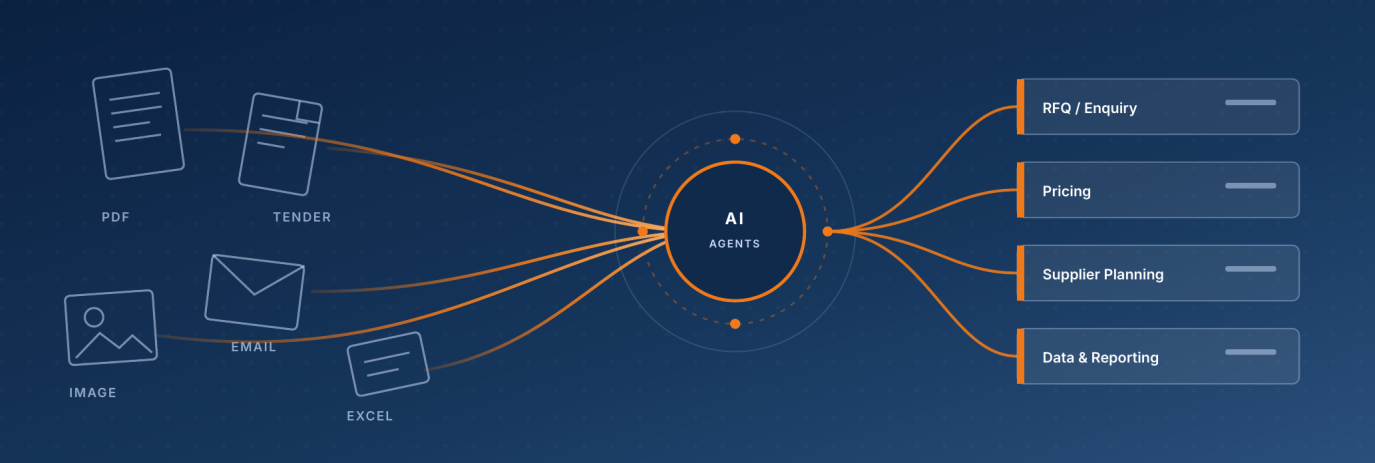
RFQs arrive as emails, PDFs and photos. Pricing lives in spreadsheets that only a few people can maintain. Override and exception decisions are made in inboxes, with no audit trail. VKraft's agentic AI platform takes on that manual work and leaves your people in control of the decisions.
Key benefits
- Turn RFQs, POs and enquiries from email, PDF and images into structured records within minutes.
- Apply pricing and margin rules to every quote, with compliance checked before it goes out.
- Replace fragile Excel/VBA workbooks with centralised, version-controlled rules.
- Plan by exception instead of waiting for the weekly report.
- Keep humans in the loop: AI suggests, people approve, and every action is logged.
- Deploy in your cloud or on-premises, with self-hosted or hosted AI models.
The Challenge
Hours, not minutes. Inboxes, not systems. People, not platforms.
We see four patterns in every manufacturing operations team.
Fragmented intake
Emails, PDFs, images, tender lists and supplier portals all come in separately, and each channel becomes its own manual workflow.
Spreadsheets as critical infrastructure
Pricing, planning and reporting sit in workbooks that only a few people can maintain. When those people leave, the work stalls.
The same work, by hand, every week
The same calculation, the same report and the same chase email. Doing it by hand every time means more mistakes and more wasted hours.
Decisions without an audit trail
Overrides and exception calls happen in inboxes and direct messages. By the time anyone reviews them, the reasoning is hard to piece back together.
Pain points by team
| Team | Pain points |
|---|---|
| RFQ / Enquiry | Multi-channel intake (email, PDF, OTRS); manual triage, classification and routing; no OCR for images, PDFs or tender lists; manual supplier portal submissions. |
| Pricing | Manual price calculation (standard and non-standard); slow journal generation; manual FX and commodity rate adjustments; limited margin and compliance visibility. |
| Supplier Planning | Manual Excel/VBA report generation; inconsistent stock aging and cross-dock calculations; weak PO block/unblock governance; reactive inventory exception handling. |
| Data & Reporting | Manual stock-code and master data work; MOQ, UOM and status updates done by hand; no structured intake for change requests; cleansing workflows that lack audit trails. |
The cost is slower turnaround, fragile data, and capacity wasted on work that AI can now absorb.
Why Now
A mix of pressure and capability makes this the right moment.
| Pressure | Capability | |
|---|---|---|
| Cost | Margin compression: input costs, FX swings and commodity prices are forcing tighter, faster pricing decisions. | Agentic AI is production-ready: LLMs plus rule-based checks can now run operational workflows end to end. |
| Speed | Supply chain volatility: lead times shift week to week, and planning teams need to react to exceptions, not wait for the weekly report. | Integration is cheaper: modern APIs, OCR and event-driven tools make older systems reachable. |
| People | Talent scarcity: skilled operations people are hard to hire and harder to keep on repetitive work. | ROI is measurable: use-case-led automation pays back in months, not years, with a full audit trail. |
The Solution
One platform for the work your teams repeat every week.
VKraft's agentic AI platform runs in your existing cloud or on-premises environment. It connects to your ERP, WMS/MES, supplier portals, EDI and ticketing systems. AI agents read and classify incoming documents in any format and language, apply your pricing and PO rules, and route exceptions to the right person for approval.
You automate procurement, pricing, planning and reporting on one shared foundation, with enterprise-grade security, governance and a full audit trail built in. Each new use case reuses the same agents and integrations instead of adding another one-off script.
Current state vs future state
| Current state: manual, fragmented, error-prone | Future state: orchestrated, auditable, scalable |
|---|---|
| Excel/VBA workbooks owned by individuals | Centralised rule engines, version-controlled |
| Manual triage, classification and routing | AI agents triage, enrich and route automatically |
| Reports rebuilt every week from scratch | Reports generated and distributed on schedule |
| Supplier portal entries copy-pasted | Portal submissions automated end-to-end |
| Audit trail lives in inboxes | Every action logged and traceable |
RFQ and Enquiry
Structured intake from every channel.
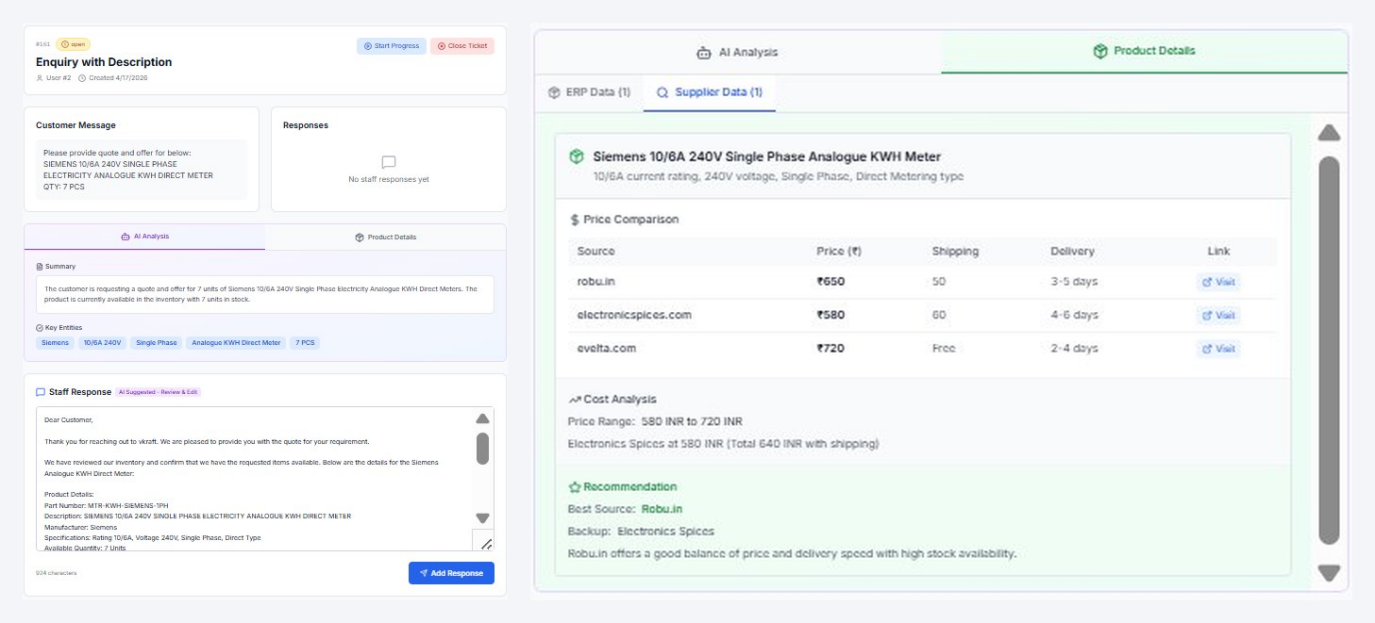
Emails, PDFs, scans, images and tender lists are captured into a single ticket. OCR and translation normalise the content, AI summarises the request and extracts key entities, and a draft reply is prepared for staff to review. Alternative suppliers, prices and lead times appear in the same ticket, and supplier portal submissions run automatically.
A free-text buyer request becomes a structured ticket with an AI summary, key entities and a suggested reply that staff review and edit. Internal records and supplier prices sit side by side in the same ticket, with alternative suppliers, lead times and a recommended source.
Pricing
Rule-driven pricing with margin guardrails.
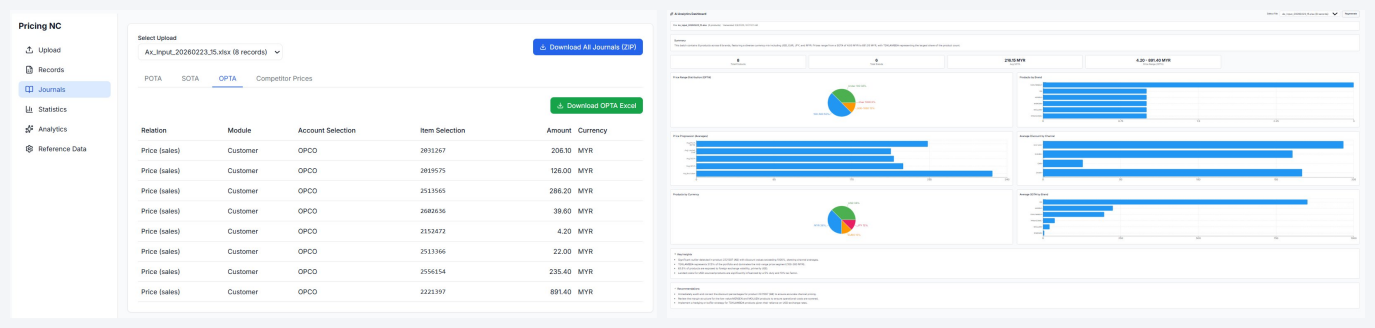
Standard and non-standard price calculations run against your rules, with FX and commodity adjustments applied automatically. Before a quote is sent, salespeople see plan price, cost and price floor with compliance status, plus pre-built concession options that protect margin.
Each pricing batch produces ready-to-post journal lines, downloadable for ERP posting. Pricing changes flow into the right journal type automatically, and each batch comes with its own dashboard, covering brand mix, currency exposure, price ranges and discount channels, with outlier detection and recommendations. The pricing team posts journals straight from the platform, with no Excel pivot and no follow-up reporting request.
Supplier Planning, Data and Reporting
Exception-led planning with PO governance
Stock aging and cross-dock calculations are standardised and delivered on schedule. PO block and unblock decisions follow rule-based approval workflows with a full audit trail, so planners work on exceptions instead of rebuilding reports.
Clean master data, controlled lifecycle
Stock-code creation and MOQ, UOM and status updates move from manual edits to structured change requests. Automated cleansing and classification keep master data reliable, and recurring reports are generated and distributed on schedule.
From Paper to Record
Powered by VKraft Document AI: more than OCR.
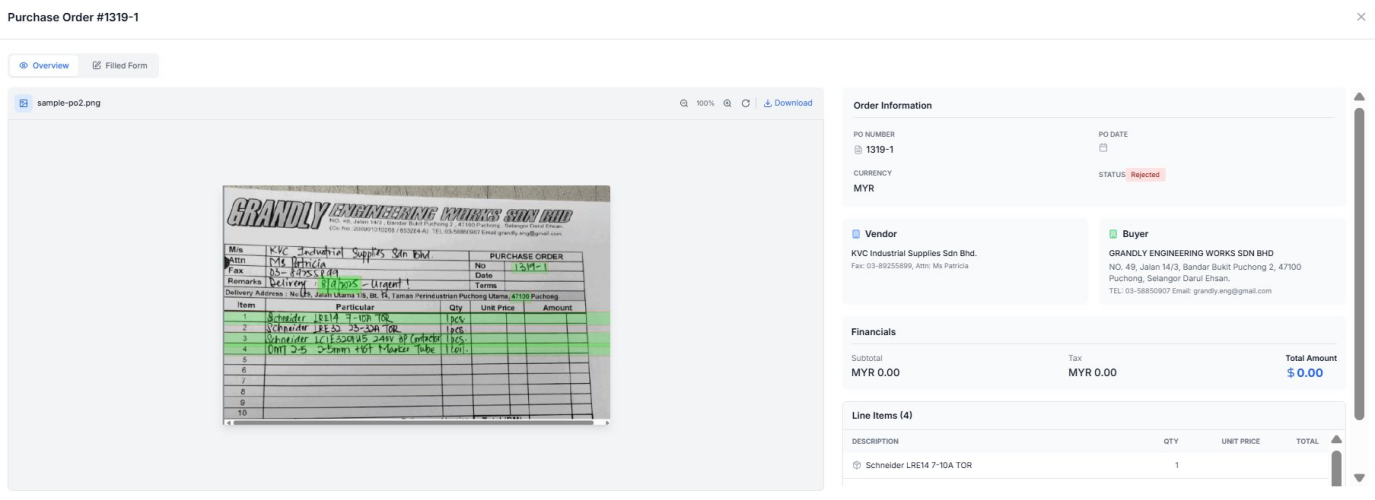
A photographed paper PO is read once. The PO header, vendor and buyer, line items and totals are extracted and matched to master data, ready for the ERP the same day, with the original image archived for audit.
- Layout-aware OCR combined with vision-language models reads scans, phone photos, handwriting, stamps and tables in multiple languages, with no per-supplier templates to build or maintain.
- Every extracted field carries a confidence score. Low-confidence fields go to a reviewer; clean ones post straight to the ERP.
- Accuracy is measured on your own documents during the pilot, not promised upfront.
- Self-hosted or hosted models run inside your network. With self-hosted models, cost doesn't grow with per-page cloud API fees.
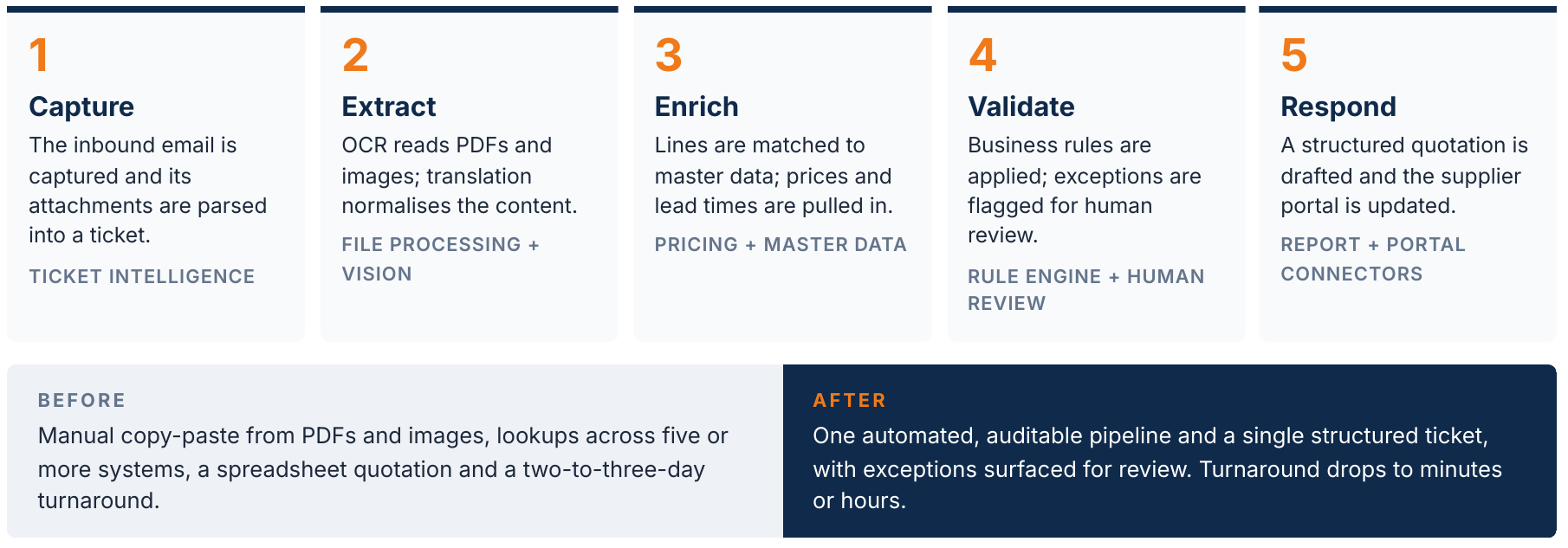
How It Works: An RFQ in Five Steps
From buyer email to supplier portal.
Scenario: a buyer emails a tender list of 47 line items, with mixed PDF and image attachments and multilingual product descriptions. A response is needed within 24 hours.
Sales360: One Workspace for the Salesperson
What to do, what it's worth and what to charge.
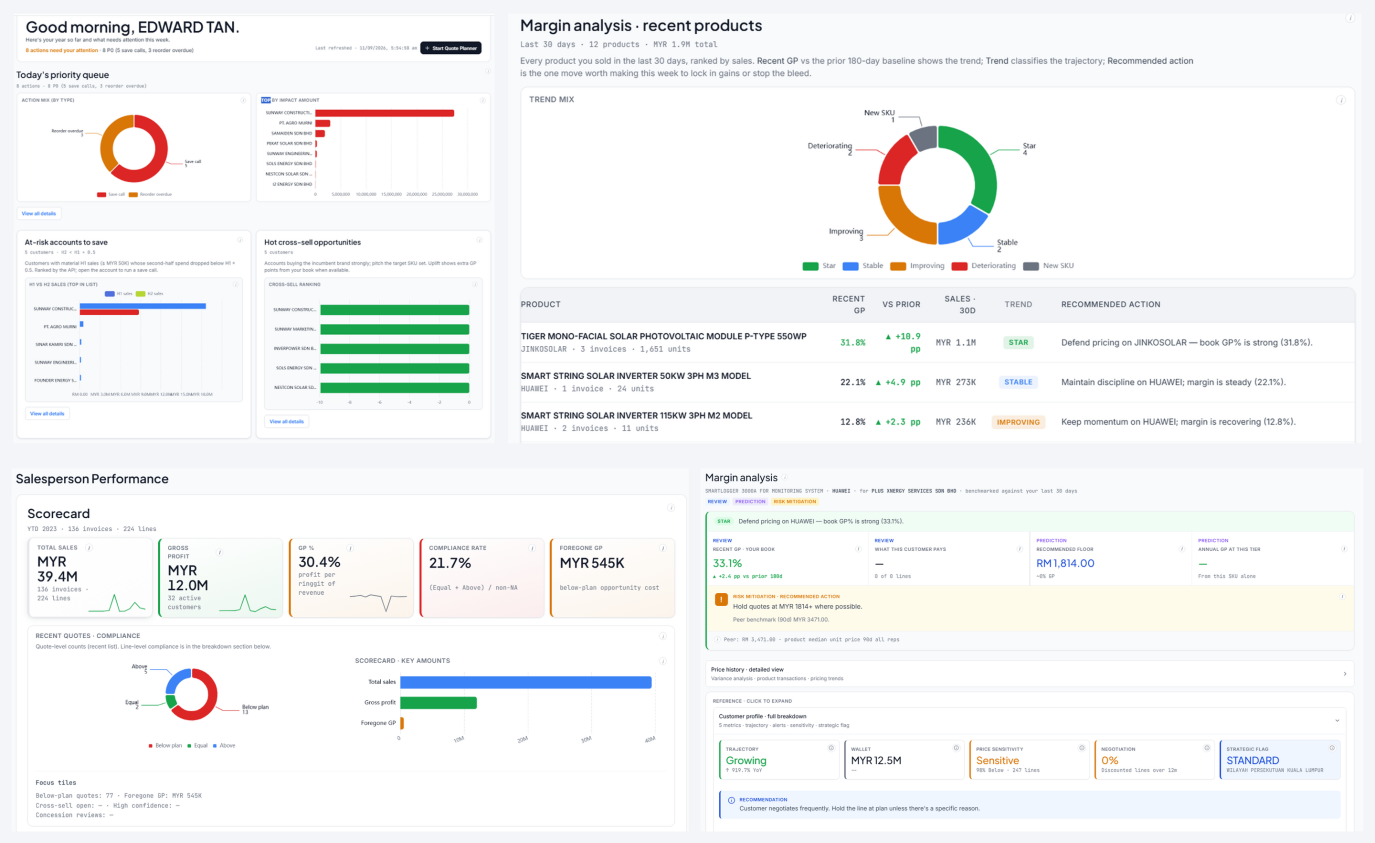
Sales360 (Sales Assistant) brings priorities, margins, performance and product insight into a single view, so salespeople don't have to dig through five systems before every call.
Daily priority queue
What needs attention today: quotes, calls and overdue reorders, ranked by impact.
Margin analysis
GP trend against baseline for each product, with a recommended action per SKU.
Performance scorecard
Sales, GP %, compliance, top customers and top products in one view.
Product deep-dive
Per-SKU price prediction, customer buying behaviour and alternative brands at a glance.
Quote Planner: From Customer to Compliant Quote
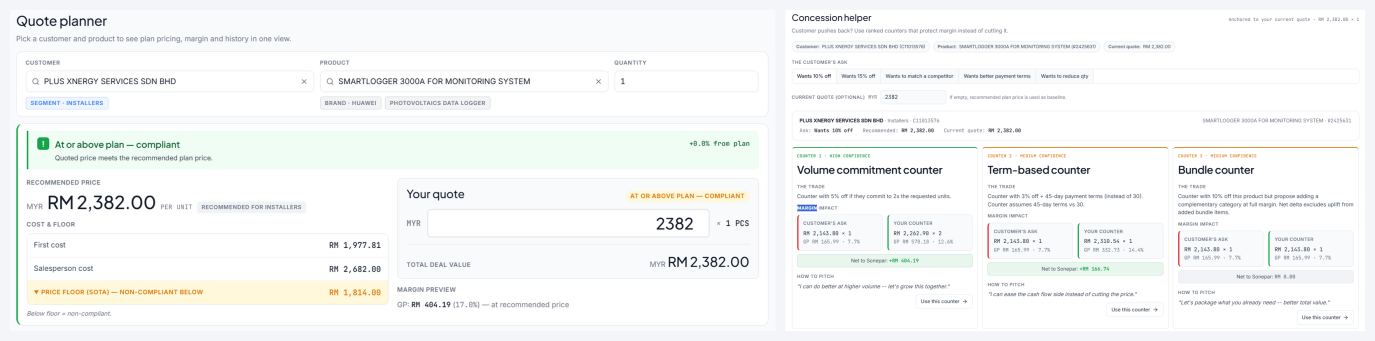
Every quote runs through the same guardrails, so pricing discipline happens by default.
1. Pick customer, product and quantity
Three inputs. Cost, plan price, customer history and segment are pulled in the background.
2. Recommended price with margin preview
Plan price, first cost, salesperson cost and price floor in one panel, with compliance status before sending.
3. Concession helper
Ready-made counter-offers (volume, terms, bundle) when the customer pushes back, to protect margin instead of cutting price.
4. Price transparency and history
Flags before the quote goes out, with the customer's past prices and recent peer activity shown inline.
Salespeople start the day knowing what to chase, what it is worth and what to charge. The pricing rules sit inside the workflow, so every quote is auditable and every discount is intentional.
Platform Foundation
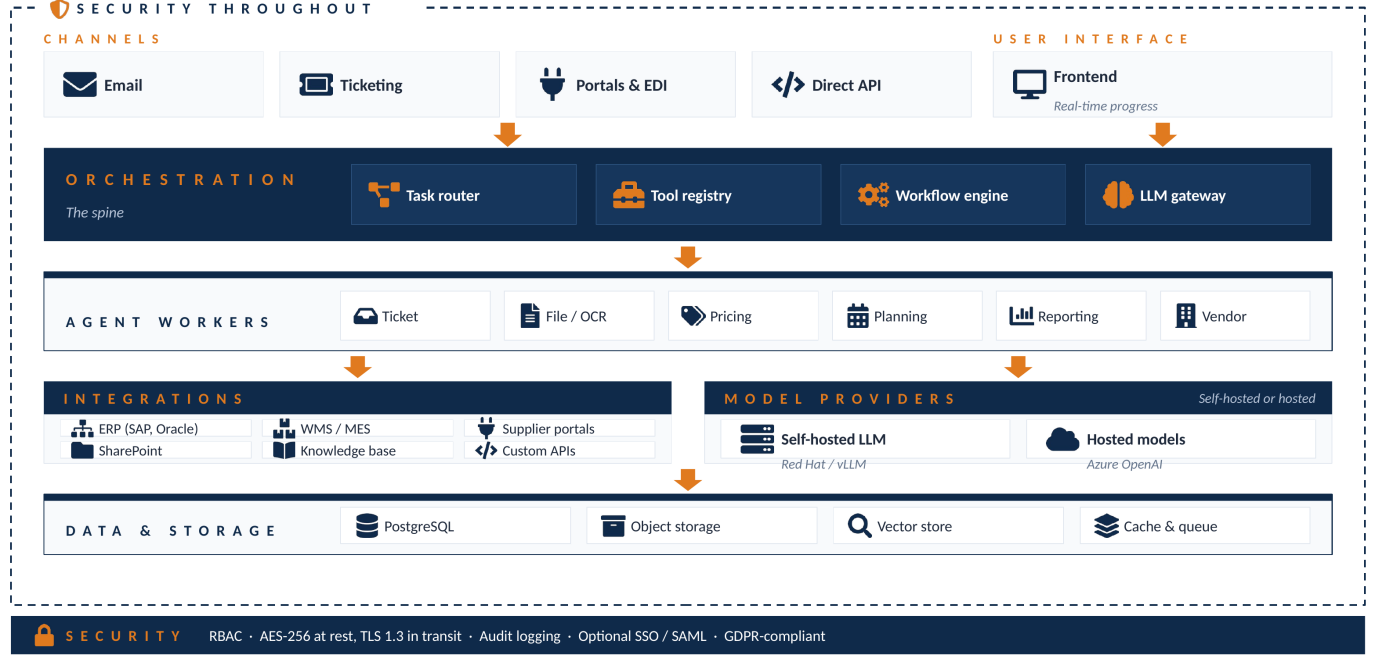
Shared by every use case.
Every use case runs on the same agent orchestrator, integration layer, LLM and OCR engines, and security and audit controls, so each new use case adds to one platform rather than creating another one-off script.
Value and ROI
Projected outcomes.
Projected for a typical mid-size manufacturing operation. Actual results depend on scope, volumes and baseline, which we measure first and track in every phase.
Where the savings come from
- Headcount redeployed: Hours spent on repetitive work move to judgment calls and customer-facing tasks.
- Fewer errors and reworks: Rule-based checks cut wrong prices, missed line items and corrective cycles.
- Faster cycle times: Quotes, POs and reports turn around in hours, freeing working capital.
- Better pricing discipline: Consistent rule enforcement on RFQs reduces margin leakage.
Business outcomes by team
| Team | Outcome |
|---|---|
| RFQ / Enquiry | Materially shorter response times and tighter supplier collaboration. |
| Pricing | Tighter margin discipline, with pricing as a commercial lever. |
| Supplier Planning | Faster planning cycles, with capacity freed for exception management. |
| Data & Reporting | Trusted master data, so downstream processes simply work. |
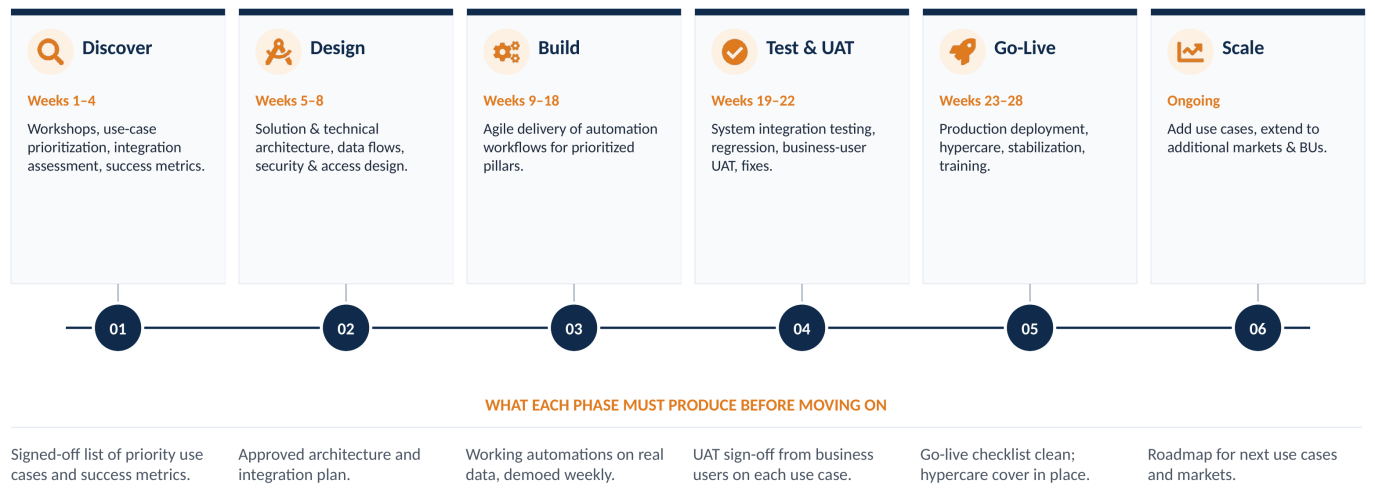
Implementation Roadmap
A phased, low-risk path from discovery to scaled rollout.
Each phase must produce a defined output before the next one starts.
Delivered with Low Risk
Use-case led
Start with two or three high-impact use cases that prove value early, so first value lands in weeks, not quarters.
Human in the loop
AI suggests and people approve. Every decision has a named approver and an audit trail.
Reusable foundation
Each use case adds to a shared platform of agents, integrations and UI.
Measured outcomes
Baseline first, then track savings, speed and accuracy in every phase.
Take the Next Step
| Step | Duration | What happens |
|---|---|---|
| 1. Discovery workshop | Half day | Map your current state and identify the highest-impact starting use cases. |
| 2. Tailored proposal | 1–2 weeks | Use-case scope, integration assessment, ROI model and phased plan. |
| 3. Pilot | 8–12 weeks | Prove value on your prioritised use cases before scaling further. |